

If you’re serious about a career in analytics or performance marketing, understanding how Google Analytics 4 tracks user behaviour isn’t optional — it’s foundational. One question that trips up almost every beginner (and more than a few working professionals) is the difference between GA4 events and conversions. They sound similar, they live in the same dashboard, and yet mixing them up can quietly wreck your reporting and your campaign decisions.
This guide breaks down exactly how GA4 tracks website actions, why the distinction matters, and how you’d actually use this knowledge on the job — the kind of practical skill that’s covered in depth during a proper digital marketing course rather than picked up through scattered YouTube videos.
Search Intent: What People Actually Want to Know Here
Anyone searching for “GA4 events vs conversions” usually falls into one of three buckets: students trying to understand analytics fundamentals, marketers auditing a client’s tracking setup, or business owners wondering why their conversion numbers look off. The intent is informational but practical — people want a clear definition, a working example, and enough context to fix their own setup. That’s what this article delivers.
What Is an Event in GA4?
In GA4, almost everything a user does on your website is captured as an event. Page views, scrolls, clicks, video plays, form starts, file downloads — these are all events by default. GA4 was built around this event-based data model from the ground up, replacing the old session-and-pageview structure of Universal Analytics.
There are four categories of events in GA4:
- Automatically collected events – page_view, session_start, first_visit
- Enhanced measurement events – scroll, outbound_click, site_search, video_engagement
- Recommended events – predefined names Google suggests for common actions like sign_up or login
- Custom events – anything you define yourself, like a “quote_form_submitted” event
Every single one of these gets logged in GA4’s Events report, whether or not it matters to your business goals.
What Is a Conversion in GA4?
A conversion is simply an event you’ve manually marked as important. GA4 doesn’t automatically know that a “form_submit” event means someone booked a course consultation and a “scroll” event doesn’t. You have to tell it.
To do this, you go into GA4’s Admin panel, find the event you care about, and toggle it as a “key event” (GA4’s current term for conversion, following a naming update from Google in 2024). Once marked, that event shows up in your Conversions report and can be used for campaign optimisation, attribution modelling, and bidding in Google Ads.
In short: every conversion is an event, but not every event is a conversion.
Why the Difference Actually Matters
This isn’t just terminology. It has real consequences:
| Aspect | Events | Conversions |
| Volume | Dozens of event types can fire per session | Only the ones you mark matter |
| Purpose | Track behaviour and engagement | Track business-critical actions |
| Reporting | Events report, Explorations | Conversions report, Google Ads |
| Default state | Auto-tracked | Manually flagged |
| Business impact | Informational | Directly tied to ROI |
If you leave everything unmarked, your conversion report stays empty and you can’t optimise ad spend properly. If you mark too many low-value events as conversions — like every button click — your data gets noisy, and platforms like Google Ads start optimising toward the wrong signals. Getting this balance right is a core skill taught in most structured digital marketing training programs, because it directly affects how campaign budgets get spent.
A Practical Example
Say you run an ecommerce store. Here’s how the two concepts play out:
- A visitor lands on a product page → page_view event fires (not a conversion)
- They scroll 90% down the page → scroll event fires (not a conversion)
- They add the item to cart → add_to_cart event fires (could be marked as a conversion for engagement tracking)
- They complete checkout → purchase event fires (almost always marked as a conversion)
Only the purchase event tells you real revenue impact. Everything before it is useful for understanding the funnel, but it isn’t the outcome you’re being measured on.
Common Mistakes Students and Marketers Make
- Marking too many events as conversions, which dilutes campaign optimisation signals
- Never checking the Events report, missing early signs of broken tracking
- Confusing “conversion rate” in GA4 with e-commerce conversion rate, which are calculated differently
- Not renaming or configuring custom events properly, leading to duplicate or unclear data
- Ignoring event parameters, which hold extra context (like button text or form ID) that makes reports far more useful
How to Check and Fix Your Own GA4 Setup
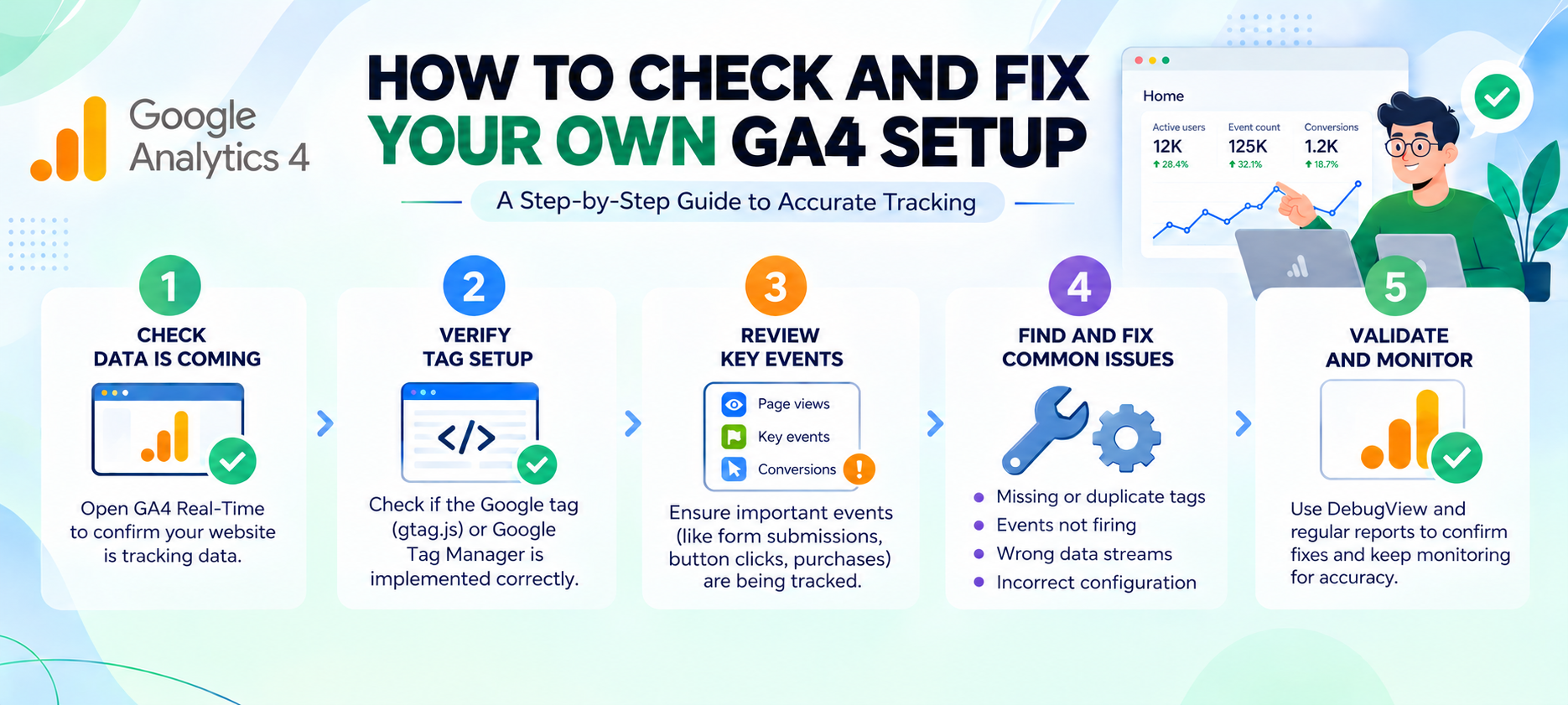
- Go to Admin > Events to see everything currently being tracked
- Identify which actions genuinely matter to the business (leads, purchases, sign-ups, downloads)
- Toggle those as key events under Admin > Conversions (or via the “Mark as key event” switch)
- Regularly audit — GA4 setups drift over time as websites change
This kind of hands-on configuration work is something you build confidence in only through practice, which is why case-study-based learning matters more than theory alone when studying analytics.
FAQs
1. Are GA4 events and conversions tracked differently on the backend?
No. Both are stored as events in GA4’s underlying data model. A conversion is just an event flagged with an additional attribute.
2. Can I have too many conversions in GA4?
Yes. Marking low-value actions as conversions can confuse automated bidding strategies in Google Ads and make your reporting less meaningful.
3. Does GA4 call conversions something else now?
Yes, Google introduced the term “key events” for advertising accounts, though “conversions” is still used in many parts of the interface and documentation.
4. Is a page view ever a conversion?
It can be, if you deliberately mark a specific page (like a thank-you page) as a key event — though this is generally discouraged in favour of tracking the actual form submission event.
5. How many conversions should a small business track?
Usually 3–5 meaningful actions, such as a form submission, a phone click, a course enquiry, or a completed purchase.
6. Do I need coding knowledge to set up GA4 events?
Basic custom events can be configured without code using Google Tag Manager, though more advanced tracking benefits from understanding the dataLayer.
7. Why is my GA4 conversion count different from my ad platform’s count?
Attribution models, time lags, and data thresholds differ between GA4 and platforms like Google Ads, so small discrepancies are normal.
Final Thoughts
Understanding GA4 events versus conversions isn’t just an analytics footnote — it’s a skill that separates marketers who can read a dashboard from those who can actually act on it. If you’re based in Kolkata and want to build this kind of practical, job-ready expertise properly, structured mentorship makes a real difference over self-study alone.
Explore Moople Institute’s digital marketing course to learn GA4, campaign strategy, and analytics hands-on, guided by instructors who work with real client data every day.

Farhat Jabeen is passionate about documenting the student enrollment journey in the fields of technology, design, and digital media. Through her writing, she shares practical guidance, industry insights, and real-world learning experiences that help aspiring students confidently navigate their path toward creative and technology-driven careers. Her goal is to empower learners with the knowledge they need to choose the right educational journey.