Learning game development can feel overwhelming when you are starting from zero. You may need to understand game mechanics, 3D modelling, animation, level design, scripting, physics, user interfaces and a game engine such as Unity—all at the same time.
This is where AI is changing the learning experience.
Today, AI tools can explain unfamiliar code, suggest solutions to errors, help brainstorm game mechanics, create placeholder assets and guide beginners through parts of a development workflow. Unity’s current AI tools, for example, can work inside the Unity Editor, understand project context and assist with coding, scene creation and other development tasks.
However, AI is not a replacement for learning game development fundamentals. Used correctly, it acts more like a learning assistant: it reduces repetitive work and helps beginners understand problems faster.
That distinction matters if you are considering a game development course, a 3D game design course, or planning to learn independently.
Table of Contents
What Is AI-Assisted Game Development Learning?
AI-assisted game development learning means using artificial intelligence as a support tool while learning programming, game design, 3D modelling, animation, level design, and game-engine workflows.
Instead of asking AI to create an entire game for you, you use it to understand concepts, troubleshoot errors, generate ideas and accelerate repetitive tasks.
AI-assisted game development learning is the use of AI tools to support coding, debugging, game design, asset creation, research and learning while the student remains responsible for understanding, testing and improving the final game.
This approach is particularly useful for beginners because many early frustrations come from small problems rather than difficult game-development concepts.

For example, a beginner may understand the idea of a player jumping but struggle to understand why a C# script produces an error. An AI assistant can explain the error in simpler language and suggest where to investigate.
Why Beginners Struggle With Game Development
Game development combines several creative and technical disciplines.
A beginner might encounter:
- Game engines and editor interfaces
- C# or another programming language
- 3D modelling and texturing
- Character animation
- Physics systems
- Lighting
- UI design
- Audio
- Level design
- Version control
- Performance optimisation
The challenge is not simply learning each topic. It is understanding how those topics work together.
Unity’s current beginner resources specifically introduce learners to the editor, physics, C# scripting, and game-design fundamentals before moving toward playable projects.
AI can make this learning curve less frustrating by providing immediate explanations and suggestions.
How AI Tools Help Beginners Learn Faster
AI can speed up learning in several practical ways.
1. Explaining difficult concepts
Instead of searching through multiple tutorials, a beginner can ask:
“Explain Unity GameObjects and Components as if I have never used a game engine.”
The important part is not simply receiving the answer. The student can then open Unity and apply the concept.
2. Breaking large tasks into smaller steps
“Create a 3D platformer” is too broad for a beginner.
AI can help divide it into manageable tasks:
- Create the player.
- Add movement.
- Add a camera.
- Create platforms.
- Add collisions.
- Add collectibles.
- Add a basic UI.
- Test the game.
- Fix errors.
- Build a playable prototype.
This reduces cognitive overload.
3. Providing explanations while you work
Modern game-development AI can increasingly operate within the development environment itself. Unity’s AI tools include an in-editor assistant designed around project context rather than simply acting as a general chatbot.
That means beginners can receive help while working on the actual project.
AI for Game Programming and Debugging
Programming is one of the biggest barriers for students entering game development.
AI coding assistants can help beginners understand:
- Variables
- Functions
- Classes
- Loops
- Conditions
- Player movement
- Collision detection
- Input systems
- UI interactions
- Basic game logic
Example: Understanding an Error
Imagine a Unity script produces a compiler error.
A beginner could ask an AI assistant:
“Explain this error in simple terms. Show me which line is causing it, why it happens and what concept I should learn to avoid it next time.”
This is much more useful than simply asking:
“Fix my code.”
The first prompt encourages learning. The second can encourage dependency.
A Better AI Learning Pattern
Understand → Attempt → Ask → Test → Modify → Explain
This method keeps the learner involved.
Unity’s current AI learning resources also highlight workflows for writing scripts, debugging errors and building features directly inside Unity 6.
AI for 3D Game Design and Game Art
A 3D game design course often involves more than programming.
Students may need to understand:
- 3D modelling
- Character design
- Environment creation
- Props
- Materials
- Textures
- Lighting
- Animation
- Camera composition
- Level design
AI can assist with ideation and some asset-generation workflows, but students still need to understand visual fundamentals.
Example: Creating an Environment Concept
Suppose you want to create a futuristic city level.
Instead of immediately modelling everything, AI can help you develop a concept:
Theme: futuristic Indian metropolitan city
Environment: elevated roads, compact buildings and neon signage
Gameplay: rooftop exploration
Mood: night-time, cinematic
Assets: vehicles, street props, buildings, signs and environmental effects
You can then convert the concept into actual 3D assets using appropriate software.
This makes AI valuable at the planning stage, not just the production stage.
AI for Game Ideas, Mechanics and Level Design
Game design requires creative thinking.
AI can help beginners explore questions such as:
- What makes a game mechanic interesting?
- How can a simple game become more challenging?
- What rewards should players receive?
- How can a level teach a mechanic?
- How can difficulty increase gradually?
Practical Example
Imagine a beginner wants to create a simple obstacle game.
Instead of asking AI to “make my game,” ask:
“Give me five ways to make a basic obstacle course more engaging without increasing the technical complexity too much.”
You might receive ideas involving time limits, collectibles, checkpoints or changing hazards.
The student then chooses one and designs it.
That keeps creative ownership with the learner.
AI Inside Game Engines
One of the biggest changes in 2026 is the growing integration of AI directly into development environments.
Unity’s current AI tools include an in-editor assistant, AI Gateway and MCP Server. The assistant can answer questions, write code and perform development tasks using information about the active project.
This matters because beginners often lose time switching between:
Game Engine → Browser → Tutorial → Code Editor → Search → Game Engine
Context-aware AI can reduce some of that friction.
Unity states that its current AI tools can work with project context such as scenes, GameObjects, components, packages and target platforms.
However, AI-generated changes still need review and testing. Unity also notes that AI-generated assets carry metadata and that developers remain responsible for managing usage rights and related requirements.
A Practical AI-Assisted Learning Workflow
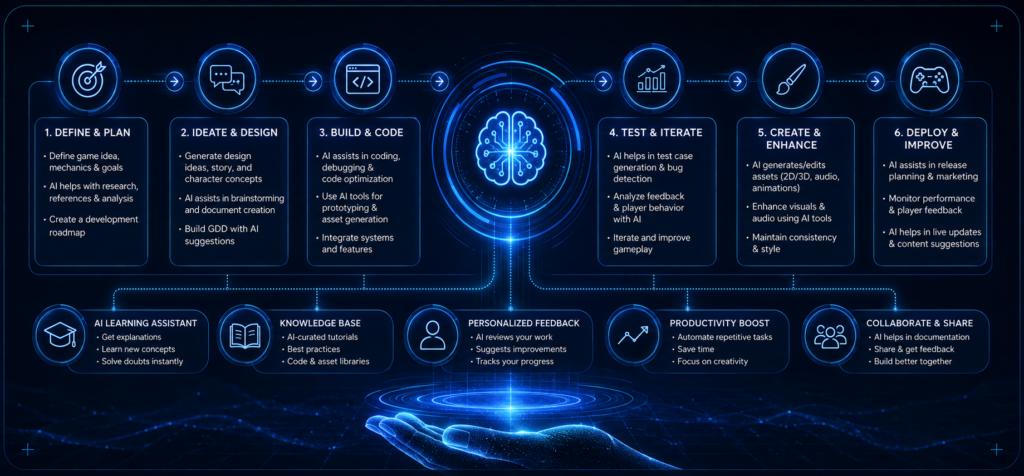
If you are completely new to game development, avoid starting with a huge project.
Step 1: Learn the fundamentals
Understand the basics of your chosen engine, programming concepts and game-design principles.
Step 2: Build a tiny prototype
Create something achievable, such as:
- A simple platformer
- A basic 3D maze
- A coin-collection game
- A small racing prototype
Step 3: Use AI when you are stuck
Ask specific questions rather than requesting complete solutions.
Step 4: Test everything
Never assume AI-generated code is correct.
Run the game and inspect the result.
Step 5: Explain the solution yourself
If AI gives you a solution, try explaining what each important section does.
If you cannot explain it, you have not fully learned it yet.
Step 6: Improve your project
Add your own design choices, mechanics, art, and optimisation.
This turns an AI-assisted exercise into a genuine portfolio project.
AI Tools vs Traditional Learning
| Learning Area | Traditional Approach | AI-Assisted Approach |
| Coding | Tutorials and documentation | Tutorials + interactive explanations |
| Debugging | Search error messages | Explain error and investigate possible causes |
| Game ideas | Personal brainstorming | Brainstorming + AI idea expansion |
| 3D concepts | Reference research | AI-assisted concept exploration |
| Learning speed | Depends on finding relevant resources | Faster feedback for specific questions |
| Skill development | Strong with guided practice | Strong when AI is used as a tutor |
| Main risk | Getting stuck | Becoming dependent on generated answers |
AI does not automatically create better developers. The quality of the learning process still depends on practice, feedback and understanding.
Common Mistakes Beginners Should Avoid
1. Asking AI to Build Everything
If AI creates your entire project, you may finish the project without actually learning game development.
2. Copying Code Without Understanding It
A script that works today may become a problem when you need to modify it tomorrow.
3. Ignoring Fundamentals
AI cannot replace knowledge of game mechanics, programming logic, 3D design or user experience.
4. Trusting Every AI Answer
AI can generate incorrect code, inefficient approaches or outdated information.
5. Building Projects That Are Too Large
Your first project should demonstrate that you can finish something—not that you can design the next AAA game.
6. Ignoring Asset and Licensing Issues
AI-generated or third-party assets may have usage restrictions. Always check the terms associated with the tool and asset before using them commercially.
Skills AI Cannot Replace
AI can accelerate the workflow, but employers still value human abilities.
A strong beginner should develop:
- Problem-solving
- Game mechanics
- Programming fundamentals
- 3D modelling
- Animation
- Level design
- Visual storytelling
- Player experience
- Communication
- Teamwork
- Portfolio development
This is why a structured game design and development course can still be valuable.
A good learning environment gives students something AI alone cannot fully provide: human feedback, guided practice, project review and accountability.
Unity Learn itself provides structured pathways designed to help learners develop skills for gaming and real-time 3D careers, with content ranging from beginner to more advanced levels.
Is an AI-Assisted Game Development Course Worth It?
For beginners, the answer depends on how the course uses AI.
A useful programme should not simply teach students how to generate content with AI. It should teach them how to think like game developers and use AI responsibly as part of the workflow.
Look for practical learning that includes:
- Game design fundamentals
- 3D game design
- Game engines
- Programming
- Character and environment development
- Animation
- Project work
- Portfolio development
- Mentor feedback
- Responsible AI usage
For students searching for a game development course after 12th, this distinction is especially important. The goal should be to develop a foundation that remains useful even as individual AI tools change.
At Moople Institute, the current Game Development Course is listed as an 18-month programme covering areas including character design, environment and level design, props, textures, character animation, motion capture and cinematics. The course page also highlights an AI-integrated educational curriculum and practical portfolio development.
Students evaluating game development course fees should therefore compare more than price. Consider duration, project exposure, faculty support, infrastructure, portfolio outcomes, and career guidance.
What Should You Learn Alongside AI?
Think of AI as one part of your toolkit.
| Skill | Why It Matters |
| Game Design | Helps you create enjoyable gameplay |
| Programming | Lets you control game behaviour |
| 3D Modelling | Helps create characters, props, and environments |
| Animation | Makes game worlds feel alive |
| Level Design | Shapes player progression |
| UI/UX | Improves interaction and usability |
| Game Engines | Connects different parts of the project |
| AI Literacy | Helps you use modern development tools effectively |
| Portfolio Building | Demonstrates your actual capabilities |
The strongest beginner is not the person who generates the most AI content.
It is the person who can use AI, understand the result, improve it, and explain why it works.
Why This Matters for Students in Kolkata
Students searching for a game development course in Kolkata or a 3D game design course in Kolkata now have an additional factor to consider: how effectively the training integrates modern AI workflows without sacrificing core skills.
Moople currently lists Game Development among its course offerings and describes its programme as focused on game art and animation.
The institute also lists multiple centres in Kolkata and surrounding areas, providing students with local access to its training ecosystem.
Before enrolling, prospective students should visit the centre, understand the syllabus, ask what software and game engines are taught, review student projects, and clarify current fee and placement-support details directly with the institute.
Explore More: 3D Game Design Courses in Kolkata: Complete 2026 Guide
Frequently Asked Questions
Can AI help beginners learn game development?
Yes. AI can explain programming concepts, troubleshoot errors, generate ideas, break projects into smaller tasks and assist with some development workflows. It works best as a learning assistant, not a replacement for practice.
Can I learn game development without coding experience?
Yes. Beginners can start without prior programming experience, although learning programming fundamentals will become increasingly important as projects become more complex. Structured beginner pathways can help learners progress gradually.
Is AI replacing game developers?
No. AI is changing parts of the development workflow, but game development still requires creative direction, programming knowledge, design judgement, testing, storytelling, and collaboration. Industry adoption is also not uniform; a 2026 Game Developer Collective report cited by GameDeveloper.com found that 29% of surveyed participants reported using generative AI, down from 36% the previous year.
Is a 3D game design course useful in the AI era?
Yes, provided the course teaches strong fundamentals alongside modern tools. AI can speed up some workflows, but students still need to understand modelling, texturing, animation, environment design, lighting, and game-engine workflows.
What should I look for in a game development course?
Look for practical projects, experienced faculty, current software, game-engine training, portfolio development, feedback, industry exposure and career support. Do not select a programme based only on course fees.
Can AI create a complete game for a beginner?
AI can assist with many parts of development, but a beginner should not rely on it to create an entire game without understanding the underlying systems. Building smaller projects yourself is a better way to develop transferable skills.
Conclusion
AI is making the early stages of game development more accessible. A beginner can now receive faster explanations, experiment with ideas, troubleshoot coding problems, and explore parts of a 3D workflow with much less friction.
But faster does not mean skipping the fundamentals.
If you are considering a game development course or 3D game design course, focus on learning how games are designed, programmed, animated, and tested. Then use AI to accelerate the work—not to replace your thinking.
For students in Kolkata, a structured learning environment can provide the combination of technical skills, creative practice, mentor feedback and portfolio development needed to move from simply playing games to creating them.
Explore Moople Institute’s current Game Development Course, review the curriculum, and speak with the admissions team about the latest duration, fees, projects, and career-support options before making your decision.

Farhat Jabeen is passionate about documenting the student enrollment journey in the fields of technology, design, and digital media. Through her writing, she shares practical guidance, industry insights, and real-world learning experiences that help aspiring students confidently navigate their path toward creative and technology-driven careers. Her goal is to empower learners with the knowledge they need to choose the right educational journey.